Google
A következő címkéjű bejegyzések mutatása: iPod. Összes bejegyzés megjelenítése

2017/07/11

iPod Jockey 2017

iPod Jockey 2017 from Takemi Watanuki on Vimeo.

“iPodJockey”is a new VJ system for the club or LIVE performance. 20~30 iPod Touch will glow like a VJ and they are all connected by wireless ,so it is possible to make a mass performance. VJ systems in the clubhouse or some kind of stage produce are not so much updating in these 10 ̃ 20 years , I thought this
“iPodJockey”will show a new direction for it. Also I thought the portait shape of the display and the brightness of the iPod (programmed to light up in the most highest level) will realize the audience it is a smartphone that we usually use every day and they are used as a different way . These realization are the most interesting points in this work .

more information → https://watakemi725.github.io/app_ipodjockey

2013/03/29

PixelController Rough Cut #2. Featuring two PixelInvaders panels

PixelController Rough Cut #2. Featuring two PixelInvaders panels from michu on Vimeo.

PixelController is an OpenSource LED matrix controller software by Michael Vogt 2010-2013.
PixelController was developed to support my own PixelInvaders Panels (http://pixelinvaders.ch), meanwhile it support a lot of different hardware.

This "Rough Cut" video shows new features of the upcoming 1.3.1 release. New features:
-Wireless PixelInvaders Panels
-OSC Generator: use Processing (or any tool you like) to send images to PixelController.


**Update: PixelController v1.3.1 released, see http://neophob.com/2013/03/pixelcontroller-v1-3-1-released/ for more details**


I included some nice Processing code examples, like using your Android phone's camera to stream to PixelController.


PixelController is an OpenSource project, hosted on GitHub: github.com/neophob/PixelController
Download URL: code.google.com/p/pixelcontroller/downloads/list

Music by Garth Knight - Creepshow Theme: https://soundcloud.com/garth_knight/garth-knight-creepshow-theme

2012/11/20

VJ in your pocket

Transform your iPhone or iPod touch into a cutting-edge mashup machine for your music and videos: http://www.algoriddim.com/vjay-iphone Mix and scratch your favorite music videos from iTunes or combine songs from your music library with personal video footage into an interactive audio visual experience. You can even use the built-in camera on your device to add your very own clips to the mix with added special effects. The first of its kind on the iPhone or iPod touch, vjay lets you create fun video mashups, display directly to a TV, or record your performances live to share instantly on Facebook or YouTube.

2012/05/11

HyperSpace 3D Synth


HyperSpace 3D Synth from strange agency on Vimeo.
Just released! The latest and greatest in our series of Space synths for iOS.

Synthesize music with sculpted waves; grok mesmerizing visuals.

More at:
http://thestrangeagency.com/products/hyperspace/

VGA output on the way, for iPhone-controlled projections!

2011/10/31

Mail from Christian Sander

"Dear vj labor - Team,
last week we released our Visual Music Clip "TELEPHONE HELICOPTER
APPLAUSE GUNSHOT" by Lorenz Rhode, that was blogged at BoingBoing
(http://bit.ly/nCX2rG), Nerdcore.de, etc.
Now we want to introduce our related interactive Visual Music App
"Synse THAG" for iPhone and iPad.Video artist Anne Lucht captured a
casual kitchen sit-in between a low-res alien gang and their hooded
flatmates, bopping their heads to Lorenz Rhode's krautrocky tune
TELEPHONE HELICOPTER APPLAUSE
GUNSHOT.http://www.youtube.com/watch?v=TRg1FsbXBmc
Here you can try the
iPhone-Version:http://itunes.apple.com/us/app/synse-thag/id472694211?&mt=8Promo-code:
MHMKPYE73YXK
and the iPad-Version:http://itunes.apple.com/us/app/synse-thag-for-ipad/id472829856?&mt=8Promo-code:
99NX3HTK6XJW
__Press-Text:Synse-team got a fresh visual music set for you: Synse
THAG! Video artist Anne Lucht captured a casual kitchen sit-in between
a low-res alien gang and their hooded flatmates, bopping their heads
to Lorenz Rhode's krautrocky tune TELEPHONE HELICOPTER APPLAUSE
GUNSHOT.
Synse is an interactive Visual Music App: It combines controlling
music and visuals with Multitouch and creates a unique audiovisual
experience.
Also check out the original award-winning iPhone-App "Synse - Visual
Music App" http://www.youtube.com/watch?v=B3OK5Hw8Tus
Visuals: www.anne.deMusic: www.facebook.com/lorenzrhodeApp: www.synse.net___

here are some App-Screenshots:
http://dl.dropbox.com/u/698157/Synse_Public/SynseTHAGscreenshots.zip

I'm really looking forward to your feedback and hope you'll enjoy the App.
Thanks & Greetings from Duesseldorf,Christian Sander

-- 
-

HOMEPAGE: www.synse.net
EMAIL: christian@synse.net

FACEBOOK: http://www.facebook.com/Synse
TWITTER: http://twitter.com/#!/Synse_App "


iPhone: http://itunes.apple.com/us/app/synse-thag/id472694211?&mt=8
We've got a fresh visual music set for you: Synse THAG! Video artist Anne Lucht captured a casual kitchen sit-in between a low-res alien gang and their hooded flatmates, bopping their heads to Lorenz Rhode's krautrocky tune TELEPHONE HELICOPTER APPLAUSE GUNSHOT.

iPad: http://itunes.apple.com/us/app/synse-thag-for-ipad/id472829856?&mt=8

Watch full Visual Music Clip by Anne Lucht that takes you for a trip round the town of Düsseldorf, Germany - the place where electronic music made some huge leaps 30-40 years ago with bands like Can, Neu! and Kraftwerk.
http://www.youtube.com/watch?v=-1TwWsysGsQ

And check out the original Synse-Version with 3 more Visual Music sets onhttp://www.synse.net
__
http://www.anne.de
http://www.lorenzrhode.de
http://www.facebook.com/synse

2011/05/27

2011/04/29

WireGUI


WireGUI is a controller application for the iPhone and iPod Touch. It uses Open Sound Control (often referred to as "OSC"), which is a protocol allowing the transmission of chunks of data (numbers and strings) over standard networks, such as a local ethernet or wireless setup, or across the internet. This data is most often used to control software for making music or video, but in fact can be used for any purpose.


A day after the App’s initial approval, version 1.3 has already been submitted. The most significant update is the ability to sequence values. Also present are extra OSC message options, a “default” button, a “remember last time” preference setting which retains the last created setup when the app is rebooted, the ability to add a random mystery group, and some interaction and stability improvements. It will hopefully appear within the next few days.
Compose arrangements of GUI object groups on the device just by dragging and dropping icons, and making other simple adjustments. Resize and even rotate groups. Sequence the values. WireGUI is quick and easy to use, yet still flexible and powerful.
http://chrisjeffs.com/wiregui/

2011/04/01

tappr.tv

Do you remember how Windows media player would provide trippy visuals to go with your music as you played it?
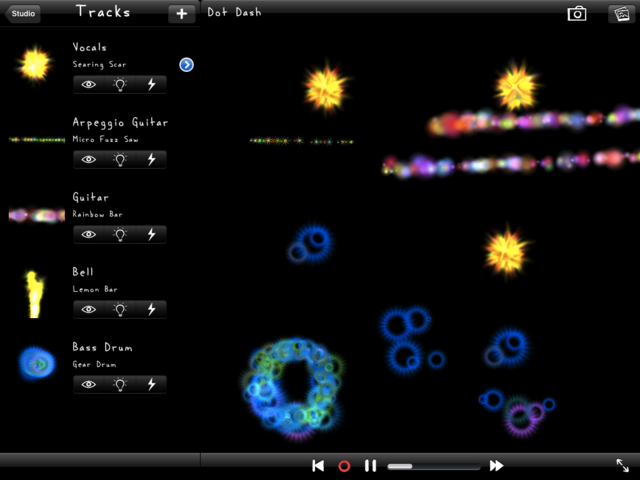
That's exactly what new app Tappr.Tv lets you create for yourself. By touching, tapping and tilting the screen in time to the music and creating musically inspired swirls.
They describe it as a "visual scratching" - it lets you make dynamic visuals to accompany music tracks which you can then save, edit and play back.
They say: "DJs scratch audio records, VJs make visuals to music, tappr.tv is visual scratching for iPad, iPhone, and iPod touch."
"Tappr.tv lets users make their own dynamic visuals using over 100 particle-based instruments. Each instrument uniquely responds to the user's touches and tilts with bursts of particles and light."

Tappr.Tv is free on iTunes

DJs scratch records, VJs play visuals to music, tappr.tv is visual scratching for iOS. With tappr.tv version 3, you can pick songs from your iPod library and create multitrack animations.

2011/01/21

Synse DJ + VJ App For The iPhone

Synse is a new visual music app for the iPhone, designed to let you sequence music and visual simultaneously.
It’s available in the App Store for $1.99.
Functions:
Video Mode (Device in portrait or landscape with Home button on the left)
In this mode you control each instrument/track and their visuals with one touch. Each instrument has its own touch area. To show these areas, simply tap on the “Show Grid” area on the left or right corners at the bottom of the screen.
Sequencer Mode (Device in landscape with Home button on the right)
Arrange a whole song by tapping inside the sequencer grid and scroll through the arrangement by swiping left or right.
Sequencer buttons:
PLAY/PAUSE: Lets you play and pause the song.
STOP: Stops the song and the locator jumps back to the beginning of the arrangement.
LOOP: When activated, loops the current bar of the arrangement.
SETUP: Shows the setup screen, where you can
?load a different set (music and visuals)
?save and load arrangements
?change the length of the song
?turn off LiveTouch mode (disables touching in video mode)
?activate Shake mode (toggle video and sequencer mode only by shaking the device)
Hint: Hold the STOP button with one finger and tap in the sequencer grid to move the locator.

Note: This Version includes three sets: PARIS, FLUID and LIFETIME. More sets are planned.

2010/11/29

The World is Your Canvas - SHOWWX+TM laser pico projector

Enjoy movies, photos, presentations and streaming video up to 100” in image size with the NEW 50% brighter SHOWWX+TM laser pico projector.
With the MicroVision SHOWWX+TM , the world's first laser projector
is now even brighter - our PicoP® display engine allows you to enjoy
deep, rich color projection with bright and vivid laser images that
are always in focus.
Even on curved surfaces. We call this 'infinite focus'.
Brings you a BIG picture from a small and quiet device. SHOWWX+TM single cable connection plugs directly into your iPod, iPhone and iPad. Works with any other mobile phone, notebook or device with TV-Out or VGA functionality.
Infinite Focus
Plug & Play
Thin & Light
Movie Capable
Wide Field of View
Wide Screen Resolution
Bright & Uniform
The SHOWWX+TM works with some of your favorite iPhone, iPad, iPod apps. Click on any of the app logos below to see how they work with the SHOWWX.

Enjoy movies, photos, presentations and streaming video up to 100" in image size with the SHOWWX+™ laser pico projector.
With the Microvision SHOWWX+, the world's first laser pico projector is now even brighter - our PicoP® display engine enables you to enjoy deep, rich color projection with bright and vivid laser images that are always in focus. Even on curved surfaces. We call this 'infinite focus'.

Instantly stream Netflix movies or television shows in big screen formation virtually anywhere with the SHOWWX+™ laser pico projector. First, turn on your SHOWWX+, connect it to your iPhone 4, iPad or iPod touch (4th generation), open the Netflix app, find what you want to watch and tap the play button. Instant big screen.
Learn more at:
http://www.microvision.com/showwxplus

2010/11/26

"Touch Resolume"


"Touch Resolume" Live Demo & Install Guide from Martin Thoburn on Vimeo.
“Touch Resolume” is a custom layout for TouchOSC that allows you to control Resolume 3 over a wireless network directly with your iphone or ipod touch WITHOUT midi mapping, just load the software and start controlling dozens of functions in Resolume, no mapping required.. Touch Resolume controls Resolume 3 directly with OSC commands.
Download Here:
martin-thoburn.com/​vj/​touch-resolume-1-0-ustom-touchosc-layout-for-resolume-3/​

2010/11/24

Luminair for iPad

An overview of the new external MIDI input feature in Luminair for iPad. Compatible with Apple's USB camera connection kit and Line 6's MIDI mobilizer dock accessory.
In this video, Livid's Ohm64 control surface is connected to Apple's USB camera connection kit via a powered USB hub.

An overview of the new external OSC input feature in Luminair for iPad. This video shows TouchOSC and a Nintendo Wii-mote controlling various parameters in Luminair.

A quick preview of Luminair for iPad. Luminair for iPad is a revolutionary multitouch DMX lighting control app, built exclusively for iOS. Available now.

2010/11/06

On iPad, iPod touch, and iPhone, New MIDI Support, via Wires, Wireless

A demonstration of using the Pianist Pro with the Apple Camera Connection Kit as a USB MIDI interface. Plug in a MIDI sound module and control it from your iPad. Alternatively plug in a MIDI keyboard and use Pianist Pro as a simple MIDI recording studio.
Coming soon in Pianist Pro V1.8.
Note that although the iPad will not recognise unpowered USB devices, bus-powered keyboards can be used with a dual-input USB cable and a powered USB hub.

For more info, please visit www.iConnectMIDI.com
iConnectMIDI enables connecting your iOS Application running on an iPhone, iPod touch or iPad to MIDI devices or computers running other MIDI applications.
Note: The iConnectMIDI shown in this clip is an early prototype and may not exactly represent as released.

Learn more at http://line6.com/midimobilizer/
MIDI Mobilizer™ is the first MIDI interface for iPhone and iPod touch. Play, record, and backup MIDI data including POD® patches, synth sounds, and more any time, any place.
Post a video postcard with the tag midi mobilizer postcard, and well post our favorites in the Line 6 blog. http://www.line6.com/blog

MIDI interface for your iPad - yes it DOES work with that as well as the iPhone and iPod Touch. Comes with MIDI Memo a basic recording app. More reviews, news and videos at http://www.sonicstate.com/

New for Pianist Pro in the V1.2 update.
Control your DAW and hardware synths wirelessly via OSC with Pianist Pro. Use Pure Data (a free application for both OSX and Windows) on your PC to receive the OSC calls and translate them into MIDI messages to suit your setup.
Play your digital piano from the sofa, or even from another room...
For more information see our website at- http://moocowmusic.com

(Link: createdigitalmusic)

2010/10/29

fluidity HD


fluidity HD from nebulus design on Vimeo.fluidity real-time interactive fluid simulation for iPhone, iPad and iPod Touch.
nebulus-design.co.uk/​fluidity
Soon available for free in the Apple App Store.
Clip music by Materia: materiamusic.com
Fluid simulation library based on MSAfluid: memo.tv
Available free on the app store here: itunes.apple.com/​gb/​app/​fluidity-hd/​id399403909?mt=8

2010/10/20

iPhon projection (iVJ)

Pár napja még ki gondolta volna, hogy iPhone-nal fogok vetíteni?
Németországba kísértem egy zenekart és a dalok közötti szünetek alatt harmadik bejátszónak az iPhonon futó iVJ-t használtam. Meglepődtem a minőségén és eredményességén. Egy kicsit még fapados, de már most is két csatornát keverhetünk egy szöveg layerrel. Csúcs! Még csak az 1.0-ás verzió, de látszik, hogy nagy lehetőségek vannak benne, csak a vas szab neki határt.

2010/09/16

iVJ - for iPhone

The VJ (video jockey) application for iPhone appears!
Video mixing ability in the palm of your hand.
You can in real time manipulate the images,as you feel it.
iVJ allows performances and presentations that include images to be made more expressive than ever before.
If you have iPhone4, the visual performance can be projected to the screen.
iPhone4 becomes a complete VJ machine!
・Swinging alpha blend mix.
・Equipped with the text layer that can input the characters in real time.
・The speed of vodes can be controlled.
・iVJ be able to select movies from the iTunes library and the CameraRoll, and image sources can be quickly forwarded from iTunes by way of the USB cable.
・Video formats supported:
H.264 video: (.m4v, .mp4)
MPEG-4 video: (.m4v, .mp4)
Motion JPEG: (M-JPEG) (.mov)
・Encouragement of video of 480×320 resolution.
You can play VJing while hearing the tune of iPod on the back ground.
・iVJ corresponds to an external output to the projector etc.
An external images can be output by buying the Apple's accessories.
※An external output becomes correspondence only of iPhone4.
Other 3GS,3G,2G iPhone/iPodTouch doesn't correspond.
Apple Composite AV Cable
http://store.apple.com/us/product/MB129LL/B
Apple Composite AV Cable
http://store.apple.com/us/product/MB128LL/B
Apple iPad Dock Connector to VGA Adapter
http://store.apple.com/us/product/IPAD_VGA_ADP
Now on release sale!
Please acknowledge it though the price is scheduled to be raised by the function upgrade.

iVJ Support
View in iTunes

2009/03/10

OSCRemote


Az OSCRemote egy ingyenes távvezérlő alkalmazás iPhon/iPod-ra Tölthető az App Store-ból.

" OSCRemote is an intuitive controller (using OpenSoundControl) that turns the iPhone/iPod into a remote control for any other piece of software on another system within the WiFi network.
Client software may e.g. be Max/MSP, Processing or Blender for which example code is provided on the OSCRemote's website below. This makes the application suitable for controlling performances of all kind.
OSCRemote is an application by Leo van der Veen, an interactive media artist based in the Netherlands.
Key features of OSCRemote :
• easily create custom controllers with the buit-in editor
• control client software using the OpenSoundControl protocol
• save files directly on the iPhone (future release will be able to upload controller files) "

Download Link